> ## Documentation Index
> Fetch the complete documentation index at: https://docs.abs.xyz/llms.txt
> Use this file to discover all available pages before exploring further.
# How It Works
> Learn more about how Abstract Global Wallet works under the hood.
Abstract Global Wallet makes use of [native account abstraction](/how-abstract-works/native-account-abstraction),
by creating [smart contract wallets](/how-abstract-works/native-account-abstraction/smart-contract-wallets)
for users that have more security and flexibility than traditional EOAs.
Users can connect their Abstract Global Wallet to an application by logging in with their email, social account, or existing wallet.
Once connected, applications can begin prompting users to approve transactions, which are executed from the
user's smart contract wallet.
Try the live demo of Abstract Global Wallet to see it in action.
## How Abstract Global Wallet Works
Each AGW account must have at least one signer that is authorized to sign transactions on behalf of the
smart contract wallet.
For this reason, each AGW account is generated in a two-step process:
1. **EOA Creation**: An EOA wallet is created under the hood as the user signs up with their email, social account,
or other login methods.
2. **Smart Contract Wallet Creation**: the smart contract wallet is deployed and provided with the EOA address
(from the previous step) as an approved signer.
Once the smart contract is initialized, the user can freely add and remove signers to the wallets
and make use of the [other features](#smart-contract-wallet-features)
provided by the AGW.
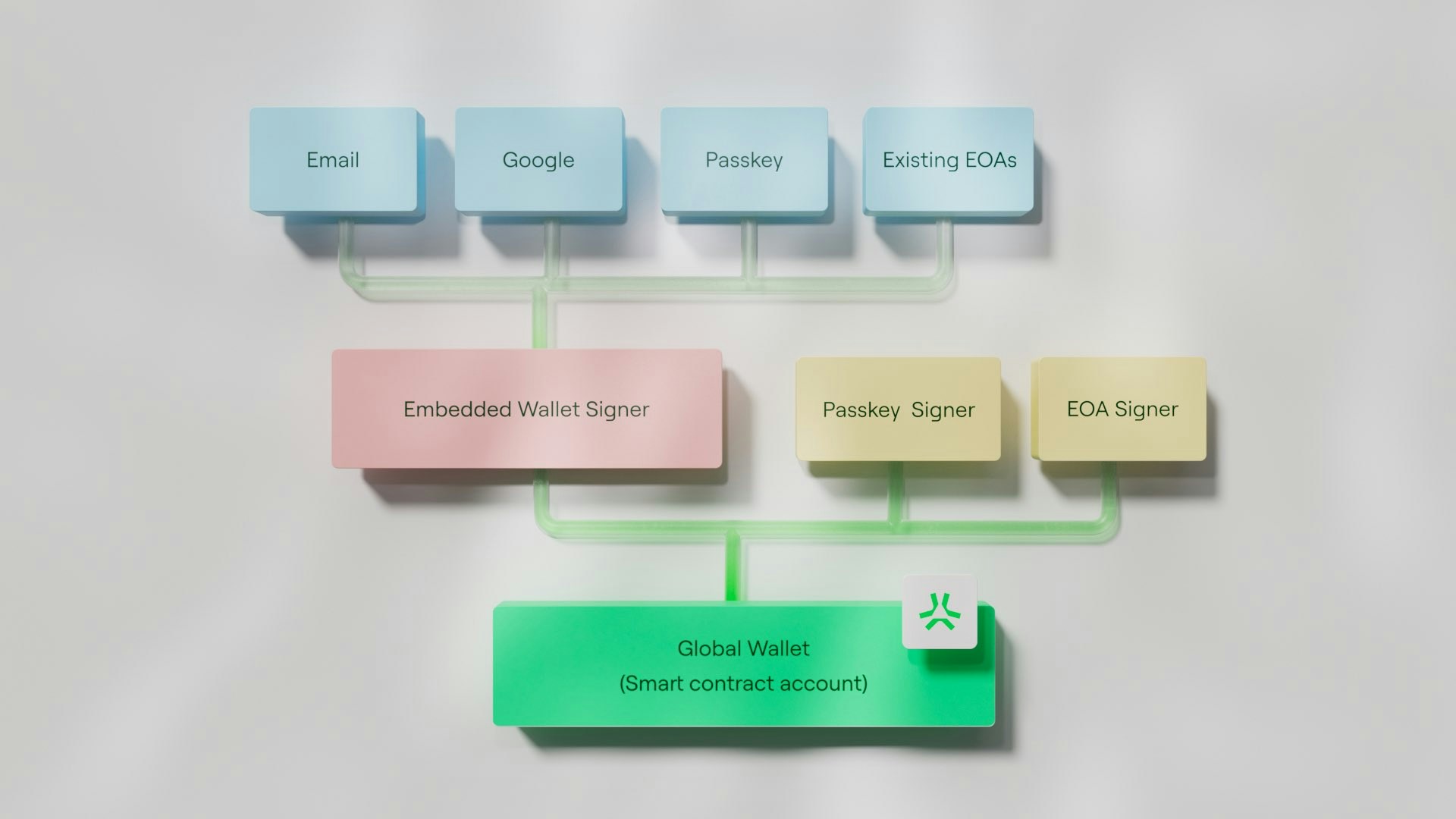 ### EOA Creation
First, the user authenticates with their email, social account, or other login method and
an EOA wallet (public-private key pair) tied to this login method is created under the hood.
This process is powered by
[Privy Embedded Wallets](https://docs.privy.io/guide/react/wallets/embedded/creation#automatic).
And occurs in a three step process:
A random 128-bit value is generated using a
[CSPRNG](https://en.wikipedia.org/wiki/Cryptographically_secure_pseudorandom_number_generator).
The 128-bit value is converted into a 12-word mnemonic phrase using
[BIP-39](https://github.com/bitcoin/bips/blob/master/bip-0039.mediawiki).
From this mnemonic phrase, a public-private key pair is derived.
The private key is sharded (split) into 3 parts and stored in 3 different
locations to ensure security and recovery mechanisms.
#### Private Key Sharding
The generated private key is split into 3 shards using
[Shamir's Secret Sharing](https://en.wikipedia.org/wiki/Shamir%27s_Secret_Sharing)
algorithm and stored in 3 different locations.
**2 out of 3** shards are required to reconstruct the private key.
The three shards are:
1. **Device Share**: This shard is stored on the user's device. In a browser environment,
it is stored inside the local storage of the Privy iframe.
2. **Auth Share**: This shard is encrypted and stored on Privy’s servers. It is retrieved
when the user logs in with their original login method.
3. **Recovery Share**: This shard is stored in a backup location of the user’s choice, typically
a cloud storage account such as Google Drive or iCloud.
#### How Shards are Combined
To reconstruct the private key, the user must have access to **two out of three** shards. This can be a combination of any two shards, with the most common being the **Device Share** and **Auth Share**.
* **Device Share** + **Auth Share**: This is the typical flow; the user authenticates with the Privy server
using their original login method (e.g. social account) on their device and the auth share is decrypted.
* **Device Share** + **Recovery Share**: If the Privy server is offline or the user has lost access to their
original login method (e.g. they no longer have access to their social account), they can use the recovery
share to reconstruct the private key.
* **Auth Share** + **Recovery Share**: If the user wants to access their account from a new device,
a new device share can be generated by combining the auth share and recovery share.
### Smart Contract Wallet Deployment
Once an EOA wallet is generated, the public key is provided to a
[smart contract wallet](/how-abstract-works/native-account-abstraction/smart-contract-wallets) deployment.
The smart contract wallet is deployed and the EOA wallet is added as an authorized signer to the wallet during
the initialization process.
As all accounts on Abstract are smart contract accounts,
(see [native account abstraction](/how-abstract-works/native-account-abstraction)),
the smart contract wallet is treated as a first-class citizen when interacting with the Abstract ecosystem.
The smart contract wallet that is deployed is a modified fork of
[Clave](https://github.com/getclave/clave-contracts) customized to have an `secp256k1`
signer by default to support the Privy Embedded Wallet *(as opposed to the default `secp256r1` signer in Clave)*
as well as custom validation logic to support [EIP-712](https://eips.ethereum.org/EIPS/eip-712) signatures.
#### Smart Contract Wallet Features
The smart contract wallet includes many modules to extend the functionality of the wallet, including:
* **Recovery Modules**: Allows the user to recover their account if they lose access to their login method via recovery methods
including email or guardian recovery.
* **Paymaster Support**: Transaction gas fees can be sponsored by [paymasters](/how-abstract-works/native-account-abstraction/paymasters).
* **Multiple Signers**: Users can add multiple signers to the wallet to allow for multiple different
accounts to sign transactions.
* **P256/secp256r1 Support**: Users can add signers generated from [passkeys](https://fidoalliance.org/passkeys/)
to authorize transactions.
### EOA Creation
First, the user authenticates with their email, social account, or other login method and
an EOA wallet (public-private key pair) tied to this login method is created under the hood.
This process is powered by
[Privy Embedded Wallets](https://docs.privy.io/guide/react/wallets/embedded/creation#automatic).
And occurs in a three step process:
A random 128-bit value is generated using a
[CSPRNG](https://en.wikipedia.org/wiki/Cryptographically_secure_pseudorandom_number_generator).
The 128-bit value is converted into a 12-word mnemonic phrase using
[BIP-39](https://github.com/bitcoin/bips/blob/master/bip-0039.mediawiki).
From this mnemonic phrase, a public-private key pair is derived.
The private key is sharded (split) into 3 parts and stored in 3 different
locations to ensure security and recovery mechanisms.
#### Private Key Sharding
The generated private key is split into 3 shards using
[Shamir's Secret Sharing](https://en.wikipedia.org/wiki/Shamir%27s_Secret_Sharing)
algorithm and stored in 3 different locations.
**2 out of 3** shards are required to reconstruct the private key.
The three shards are:
1. **Device Share**: This shard is stored on the user's device. In a browser environment,
it is stored inside the local storage of the Privy iframe.
2. **Auth Share**: This shard is encrypted and stored on Privy’s servers. It is retrieved
when the user logs in with their original login method.
3. **Recovery Share**: This shard is stored in a backup location of the user’s choice, typically
a cloud storage account such as Google Drive or iCloud.
#### How Shards are Combined
To reconstruct the private key, the user must have access to **two out of three** shards. This can be a combination of any two shards, with the most common being the **Device Share** and **Auth Share**.
* **Device Share** + **Auth Share**: This is the typical flow; the user authenticates with the Privy server
using their original login method (e.g. social account) on their device and the auth share is decrypted.
* **Device Share** + **Recovery Share**: If the Privy server is offline or the user has lost access to their
original login method (e.g. they no longer have access to their social account), they can use the recovery
share to reconstruct the private key.
* **Auth Share** + **Recovery Share**: If the user wants to access their account from a new device,
a new device share can be generated by combining the auth share and recovery share.
### Smart Contract Wallet Deployment
Once an EOA wallet is generated, the public key is provided to a
[smart contract wallet](/how-abstract-works/native-account-abstraction/smart-contract-wallets) deployment.
The smart contract wallet is deployed and the EOA wallet is added as an authorized signer to the wallet during
the initialization process.
As all accounts on Abstract are smart contract accounts,
(see [native account abstraction](/how-abstract-works/native-account-abstraction)),
the smart contract wallet is treated as a first-class citizen when interacting with the Abstract ecosystem.
The smart contract wallet that is deployed is a modified fork of
[Clave](https://github.com/getclave/clave-contracts) customized to have an `secp256k1`
signer by default to support the Privy Embedded Wallet *(as opposed to the default `secp256r1` signer in Clave)*
as well as custom validation logic to support [EIP-712](https://eips.ethereum.org/EIPS/eip-712) signatures.
#### Smart Contract Wallet Features
The smart contract wallet includes many modules to extend the functionality of the wallet, including:
* **Recovery Modules**: Allows the user to recover their account if they lose access to their login method via recovery methods
including email or guardian recovery.
* **Paymaster Support**: Transaction gas fees can be sponsored by [paymasters](/how-abstract-works/native-account-abstraction/paymasters).
* **Multiple Signers**: Users can add multiple signers to the wallet to allow for multiple different
accounts to sign transactions.
* **P256/secp256r1 Support**: Users can add signers generated from [passkeys](https://fidoalliance.org/passkeys/)
to authorize transactions.